


Home Office Desk Setup: Your Professional Guide for 2026


A lot of home office desk setups still begin the same way. A laptop lands on the kitchen table, a dining chair gets reassigned, cords snake across the floor, and the arrangement somehow becomes permanent. It works for a week. It's draining by month three.
That improvised setup isn't a small inconvenience. It changes posture, concentration, privacy, and even how the rest of the household uses the room. By December 2020, 71% of the U.S. workforce was operating from home, and 25% found it somewhat or very difficult to find adequate workspace, which is a clear reason the desk became such an important furniture purchase during the remote work shift home office ergonomics findings.
In West Texas and Southeastern New Mexico, the challenge has extra layers. Homes often do double duty. A guest room becomes an office. A corner of the living room becomes a work zone. A shared household needs one space to support focus during the day and family life at night. Heat, glare, and room layout all matter more than generic advice admits.
A strong home office desk setup solves those problems at once. It supports the body, gives the workday a boundary, and still belongs in the home instead of fighting against it.
Table of Contents
- From Kitchen Table to Command Center
- Selecting Your Hero Pieces The Desk and Chair
- Mastering Ergonomics for All-Day Comfort
- Illuminating and Organizing Your Workspace
- Bring Your Vision to Life with Miller Waldrop
From Kitchen Table to Command Center
The temporary home office usually fails in predictable ways. The screen sits too low, the chair is too hard or too soft, paperwork spreads into family space, and every work session starts with moving yesterday's clutter out of the way. That doesn't look dramatic, but it creates friction all day long.
A better workspace starts when the desk stops being treated like an accessory. It becomes the command center for meetings, focused work, storage, and posture. Once that shift happens, decisions get easier. The room doesn't need to be large. It needs to be intentional.
A productive office at home doesn't begin with decoration. It begins with giving work a place that's clearly defined and physically supportive.
That distinction matters for anyone still trying to make a shared surface do a dedicated job. A dining table asks to be cleared. A proper desk can stay set, hold equipment, and support repeatable routines. That consistency reduces the little resets that eat into focus.
In homes across Lubbock, Hobbs, and Ruidoso Downs, the strongest setups tend to follow the same principle. They respect the house and the work equally. The office doesn't have to look corporate. It should look resolved. Clean lines, proper storage, the right light, and furniture that fits the room will always outperform a larger but poorly planned arrangement.
Claim the right zone first
The first planning decision isn't which desk to buy. It's where the office should live. In a dedicated room, that sounds easy. In a guest room, loft, bedroom corner, or shared living area, it takes more discipline. The right location balances focus, circulation, and natural light.
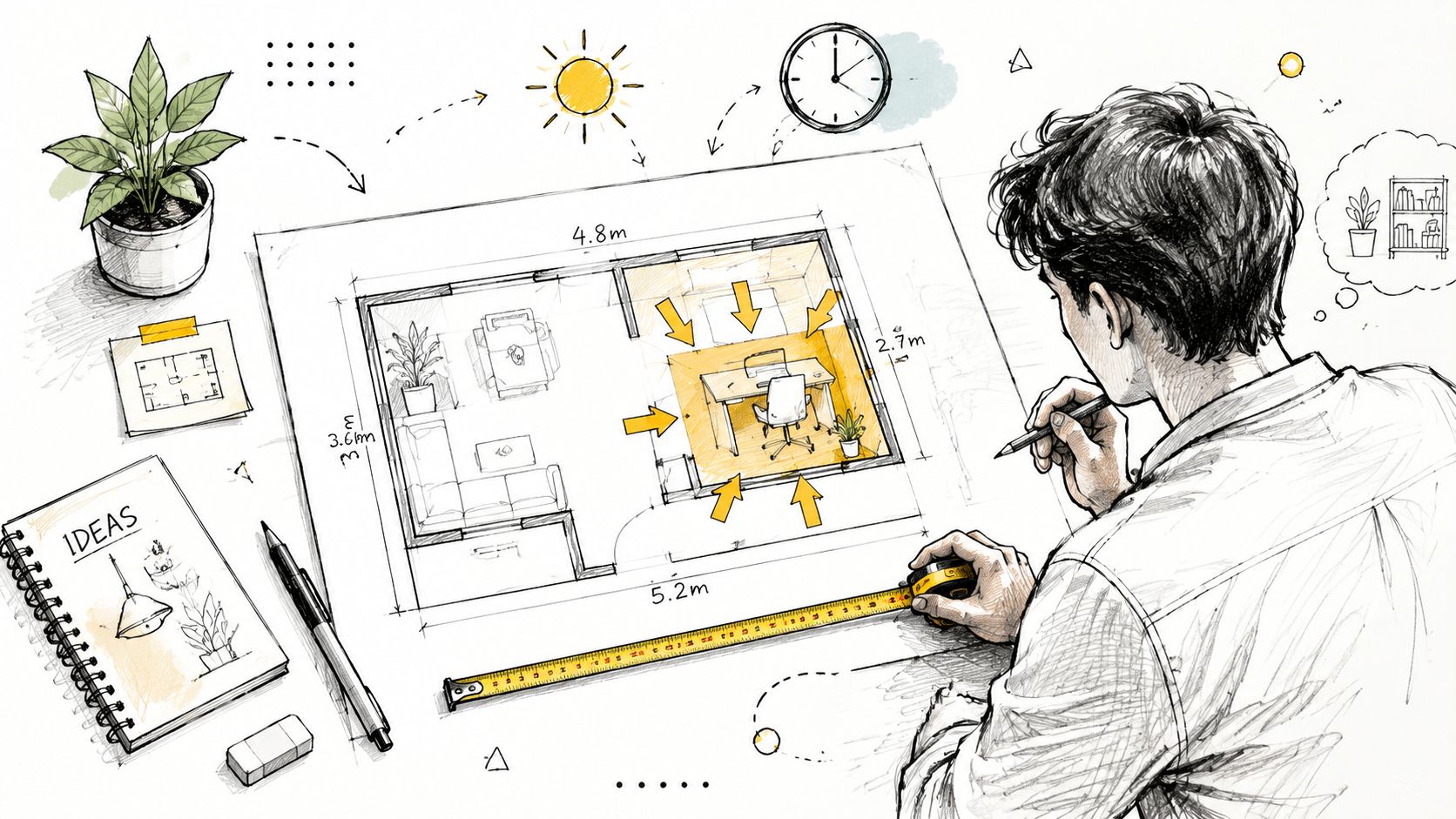
Start with a floor plan, even if it's a quick sketch on paper. Measure wall lengths, window positions, door swings, and any vents or outlets. Then mark the furniture that can't move. Bed, dresser, sofa, or built-ins come first. The desk goes where it can work without creating constant interruptions.
Natural light deserves a deliberate choice. A desk near a window usually feels better than one pushed into a dark wall, and it helps reduce eye strain when managed well. But direct glare on a screen is tiring, especially in bright West Texas and Southeastern New Mexico light. The goal isn't to face harsh sunlight. It's to borrow daylight without fighting reflections.
A practical planning checklist helps:
- Measure the working wall: Confirm whether the space can handle the desk width and chair clearance without blocking drawers, doors, or walkways.
- Study the light at working hours: Morning glare and late afternoon glare create different problems, so the room should be checked when work occurs.
- Protect circulation paths: Nobody works well when people need to squeeze behind the chair all day.
- Define what must stay nearby: Printer, files, reference materials, and charging points all influence the final layout.
For households juggling shared space, home office furniture layout ideas from Miller Waldrop offer a useful starting point for translating measurements into a workable plan.
Plan for family traffic sound and internet
In this region, many homes support several generations under one roof. That reality changes the layout conversation. A common but poorly addressed challenge is the placement of home offices in multi-generational living spaces common in New Mexico and Texas. Data shows 68% of such households report role confusion when the office is in a shared area, leading to a 35% drop in productivity due to a lack of visual and acoustic separation.
That doesn't mean a shared-space office can't work. It means it needs visible boundaries. A corner desk can define territory more clearly than a narrow writing desk floating in a hallway. A rug, upholstered side chair, cabinet, or screen can signal that the workspace has a job and shouldn't be casually absorbed back into the room.
Practical rule: If the office sits in a shared room, create separation with furniture placement first, decor second.
Internet planning belongs in the layout phase too. A beautiful desk in a dead zone creates a different kind of frustration. For households comparing service quality, placement considerations, and daily video-call demands, these Premier Broadband insights for remote workers are worth reviewing before the room is finalized.
In hotter homes or rooms with weaker cooling, desk placement also affects comfort. A spot near a bright west-facing window may look appealing at noon and feel exhausting by late afternoon. Shade control, airflow, and distance from heat gain should be part of the plan from day one.
Selecting Your Hero Pieces The Desk and Chair
The desk and chair carry more responsibility than any other pieces in the room. If either one is wrong, every lamp, shelf, and accessory has to work harder to compensate. If both are right, the room immediately feels calmer and more capable.
Choose a desk that supports the work
A desk should fit the tasks, equipment, and room size. That sounds obvious, but a lot of buyers still choose by silhouette alone. The result is often a desk that looks right from the doorway and feels cramped by the second workday.
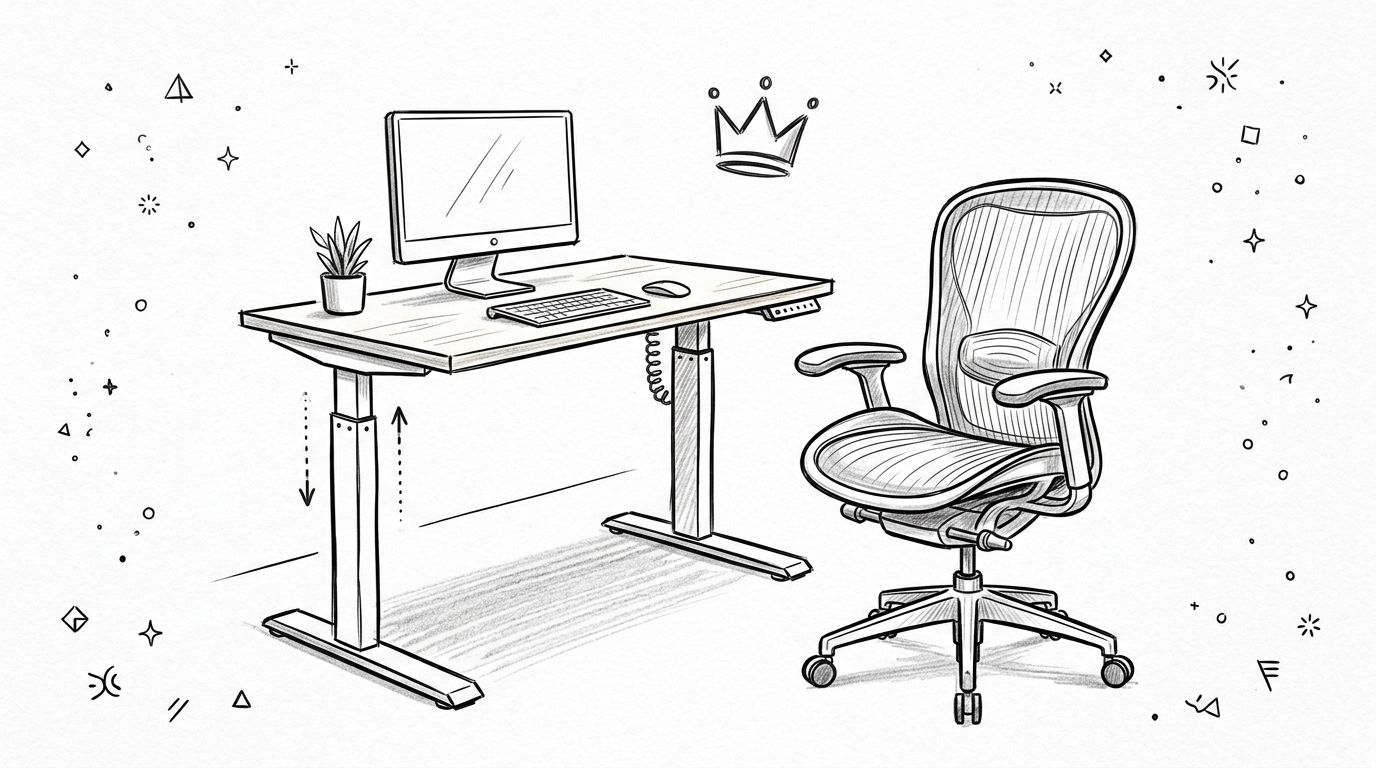
One specification matters more than many shoppers realize. A desk surface must have a minimum depth of 60cm (about 24 inches) to maintain a healthy 20 to 24 inch viewing distance from the monitor, and desks made from solid hardwood with a density of at least 40 lbs/ft³ provide better stability for heavy equipment desk depth and material guidance. That's the difference between a setup that holds steady under screens and paperwork, and one that starts wobbling every time the keyboard moves.
Different desk types solve different problems:
- Writing desks: Good for light laptop work and small rooms, but they can run short on storage.
- Executive desks: Better when the office also handles paperwork, planning, and client-facing video calls.
- Corner desks: Strong in shared or awkward rooms because they define a zone with less wasted space.
- Standing desks: Ideal for users who want posture variety throughout the day.
For readers exploring a standing option, the Josie solid mango and iron standing desk is one relevant example of a compact desk that brings vertical work potential into a home setting without looking clinical.
A good desk should feel stable, proportionate, and easy to inhabit. If it makes equipment placement feel like a puzzle, it's the wrong piece.
Material matters because home offices do more than hold a laptop. They carry monitors, lamps, notebooks, chargers, trays, and often the visual weight of the room. Solid wood or hardwood surfaces tend to age more gracefully than lightweight tops that flex under pressure.
A chair should adjust to the user not the room
People often spend more time evaluating desk style than chair performance. That's backward. The chair is the piece that has to respond to the body hour after hour. It should adjust for seat height, back support, and arm position in a way that allows the user to sit without bracing or hunching.
The right chair also depends on the room. In a dedicated office, a full ergonomic task chair often makes sense. In a guest room or bedroom office, a chair may need a softer visual profile. That doesn't mean settling for a decorative dining chair. It means looking for a supportive chair with enough adjustment to work hard and still belong in a residential space.
Three buying filters tend to prevent regret:
- Support first: Back shape and seat comfort matter more than trend appeal.
- Range of adjustment: A chair that can't adapt to the user usually forces the desk setup into awkward compromises.
- Visual fit: The piece should coordinate with the room so the office feels integrated, not imported.
A home office desk setup should never ask the body to adapt to furniture that was chosen only for appearance. Beauty matters. Comfort matters more when the workday starts stretching past an hour or two.
Mastering Ergonomics for All-Day Comfort
A polished office can still fail if the body has to fight it. Ergonomics is where style becomes usable. It's also where small adjustments deliver the biggest daily payoff.
Use the body as the measuring tool
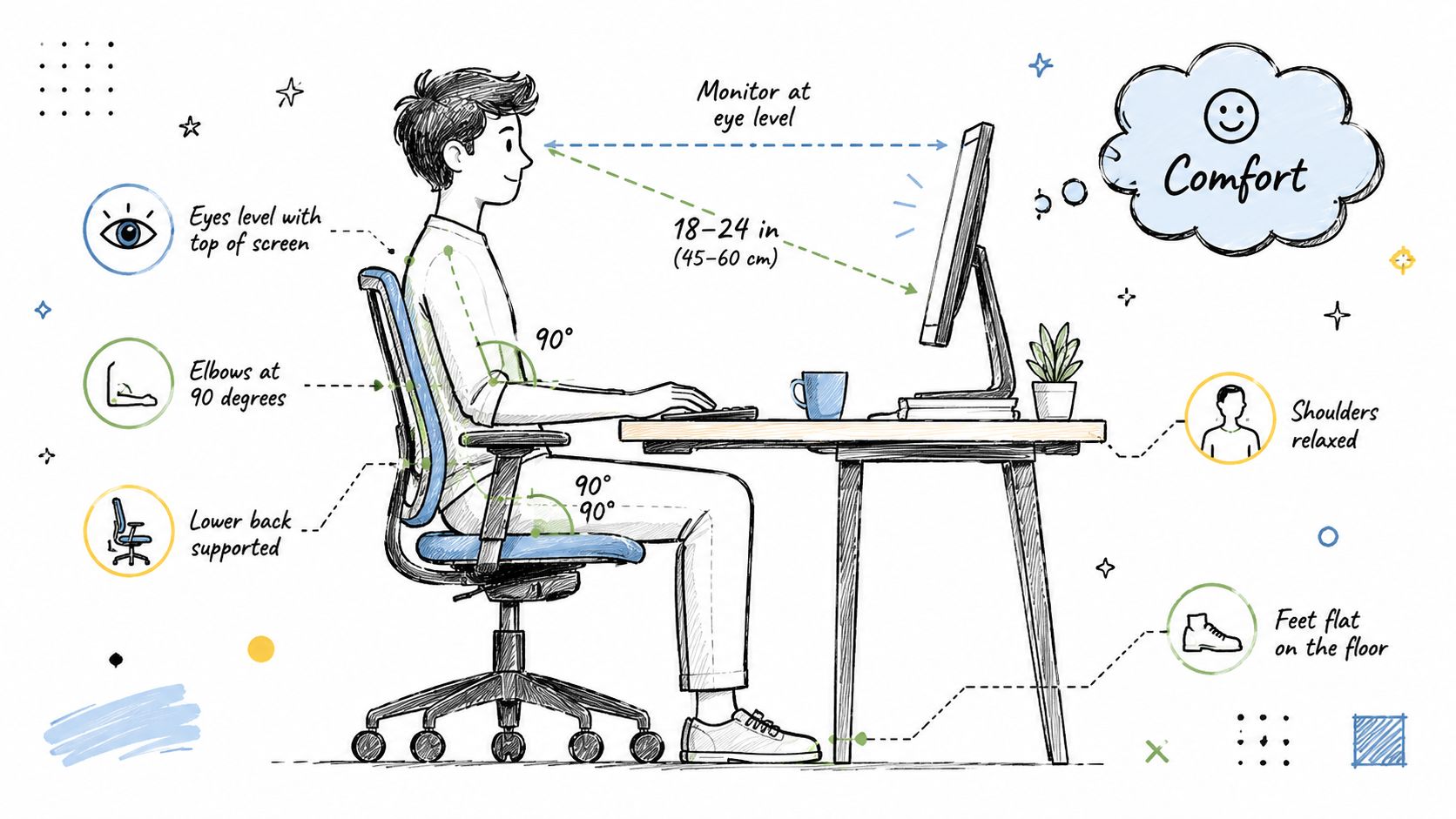
The strongest single rhythm for a sit-stand workspace is the 20-8-2 protocol. That means 20 minutes sitting, 8 minutes standing, and 2 minutes moving, and it has a 94% success rate in reducing lower back pain when paired with the right setup. To support that protocol, the monitor top should sit at eye level and elbows should stay in a 90 to 110° angle to reduce strain.
That guideline works because it avoids two common mistakes. The first is marathon sitting. The second is static standing that goes on too long and creates its own fatigue. A home office desk setup should encourage movement, not just swap one fixed posture for another.
In West Texas and Southeastern New Mexico, room temperature also changes how comfortable standing feels. Heat, low airflow, and sun gain can make an otherwise ergonomic setup feel tiring much faster. In warmer rooms, users usually do better with shorter standing intervals, better airflow, and less direct afternoon exposure.
For monitor placement, one detail gets overlooked constantly. To reduce neck and shoulder strain, the top of the screen should be at or slightly below eye level, usually requiring a vertical distance of 7 to 9 inches from the eyes to the top of the monitor, and adjustable arms with swivel and tilt can help achieve that threshold monitor positioning guidance. For readers refining screen height without replacing the whole desk, this guide to enhance your workspace with a monitor arm shows the kind of adjustability that helps fine-tune posture.
Small ergonomic errors repeat all day. That's why a monitor that's slightly low or a keyboard that's slightly high can feel much worse by evening.
Ergonomic Setup Cheat Sheet
| Component | Ideal Position | Reason |
|---|---|---|
| Monitor | Top of screen at or slightly below eye level | Helps reduce neck and shoulder strain |
| Viewing distance | About 20 to 24 inches from the screen | Supports comfortable visual focus |
| Elbows | 90 to 110° while typing | Reduces arm and wrist strain |
| Sit-stand rhythm | 20 minutes sitting, 8 minutes standing, 2 minutes moving | Supports lower back comfort and avoids static posture |
| Desk depth | At least 60cm (about 24 inches) | Creates enough space for monitor, keyboard, and mouse placement |
| Keyboard and mouse | Close enough to avoid reaching | Keeps shoulders more relaxed |
A quick self-audit often reveals the underlying issue faster than buying another accessory. If shoulders rise during typing, the work surface is likely too high. If the chin angles downward all day, the screen is too low. If wrists press into a sharp edge, the user may need to pull closer, lower the input surface, or reduce desktop clutter.
Ergonomics should feel almost unremarkable when it's correct. The body stops noticing the furniture, and attention can return to work.
Illuminating and Organizing Your Workspace
Once the desk and chair are right, the room needs support systems. Lighting and organization determine whether the setup feels calm or constantly demanding.

Layer light instead of relying on one source
Good office lighting isn't just brightness. It's control. Daylight helps a room feel alert and open, but it changes throughout the day. A task lamp lets the user keep the work surface evenly lit when natural light shifts or disappears.
The easiest formula is simple. Use ambient room light for general comfort, natural light where possible, and a focused task lamp for reading, writing, and keyboard work. This creates visual balance without washing out the screen or leaving the desk in shadow.
A dedicated task light also helps a home office desk setup feel complete. It marks the work zone and makes evening work less fatiguing than relying on a ceiling fixture alone. The Oliver Ombre task lamp is one example of the kind of lighting piece that can add focused illumination while still fitting into a residential room.
Key detail: The best desk lamp lights the work, not the user's eyes or the monitor surface.
Clear surfaces create faster decisions
Clutter isn't just visual noise. It creates tiny decisions over and over. Where's the charger. Where did the notebook go. Which paper is current. That low-grade friction pulls attention away from work.
A cleaner desk doesn't require minimalist styling. It requires designated places. The most effective setups usually include:
- A daily-use zone: Keyboard, mouse, notebook, and water stay within easy reach.
- Closed storage nearby: Less-used supplies move off the desktop but remain accessible.
- Cable control: Cords are routed behind or under the desk so the surface looks intentional.
- Vertical storage: Shelves or cabinets keep the footprint lighter in smaller rooms.
In shared homes, organization also protects boundaries. When office materials have a defined home, the room can transition more smoothly between work and family use. That matters in guest rooms, dens, and multi-use corners where visual order affects whether the setup feels like a permanent asset or an ongoing interruption.
Bring Your Vision to Life with Miller Waldrop
A home office works best when every decision supports the same goal. The desk fits the room. The chair fits the body. The light supports the task. The storage supports the routine. When those pieces align, the office starts doing its job well.
Turn a plan into a room that works
Shoppers don't need dozens of pieces. They need the right pieces in the right order. Start with the desk, chair, and lighting. Then add storage only where the workflow proves it's needed. That approach avoids the common mistake of filling the room before the daily routine is clear.
For households balancing style, comfort, and regional realities, a local furniture partner can simplify that process. Miller Waldrop Furniture & Decor offers home office furniture, design guidance, and custom-order options that help translate a floor plan into a usable room. That's especially helpful when the office has to fit a guest room, a shared family space, or a corner that needs a more precise footprint.
Why local context matters
National advice often assumes every home office lives in a spare room with even light, easy privacy, and stable temperatures. That isn't how many homes in Lubbock, Hobbs, and Ruidoso Downs function. Multi-use rooms, larger households, and regional climate conditions change what works.
Local showrooms help because furniture can be seen at scale instead of guessed at through a screen. Finish, proportion, drawer depth, and chair comfort are easier to judge in person. So is the question that matters most. Will this piece make the workday easier in the room where it has to live?
A well-planned home office desk setup doesn't need to be extravagant. It needs to be resolved. That means fewer compromises, less physical strain, and a room that supports both productivity and home life over time.
Ready to build a home office that fits the way your household really works? Visit Miller Waldrop Furniture & Decor to explore desks, lighting, and personalized design help for homes in Lubbock, Hobbs, and Ruidoso Downs. The right setup can start with one measured choice, and their team can help turn that plan into a finished room.


